Overview   Download   Purchase   Examples   Support   Resources


HDRsoft   >   Download   >   Photomatix Pro  
 
 
Download Photomatix Pro for Windows


Version: 3.1.3
Size: 2.9 MB
Platform: Windows 98/ME/2000/XP/Vista
Download Photomatix Pro 3.1.3
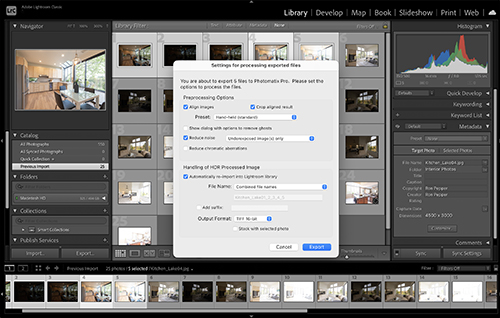
The download includes the Lightroom Export plugin. If you have Lightroom, see the installation instructions for the Lightroom plug-in.


Tips and other useful information can be found in the Photomatix FAQ.
If you haven't taken bracketed photos yet, you can download these samples:
           3 photos of Venice Grand Canal at 3504 x 2336 resolution (4 MB)
           3 photos of Cevennes landscape at 3504 x 2336 resolution (10 MB)
           3 photos of Venice carnival at 3072 x 2048 resolution (2 MB)
 
 
  If you would like to download older versions, you can do so at bottom of this page. 
 
 
Update log
Updated in v3.1.3
- Tighter integration with Lightroom. HDR options are now set from the Lightroom plug-in and the processed image can be automatically re-imported into the Lightroom library.
- Bug fixed: Processing files in Canon sRaw format caused an exception.
- Bug fixed: Transfer of exif data was not always taking the information of the normal exposure.
- Bug fixed: When tone mapping an HDR image file that was previously saved as Radiance in Photomatix Pro, the color profile was not properly embedded.
- Bug fixed: When strip processing option had been enabled for HDR generation in batch processing, checking the blending methods at the same time made the batch return an error.
- Bug fixed: Processing source images in the BMP format returned an error.
 
Updated in v3.1.2
- Added support of RAW files from recent camera models such as the 5D Mark II and Panasonic LX-3.
 
Updated in v3.1.1
- Improved display of Save Panel in 125% and 150% large font modes.
- Bug fixed: Batch Processing sometimes failed to process PSD files.
- Bug fixed: Exposure Blending with the 'H&S Adjust' method did not work correctly with relatively large files.
- Bug fixed: "360° image" option was not taken into account when batch processing with the 'Adjust' blending method or when tone mapping large HDR image files opened in preview mode.
- Bug fixed: Exposure Blending Method 'H&S Intensive' did not take into account the Strength setting.
- Bug fixed: "Don't crop" option for aligning images did not work correctly anymore with HDR generation.
- Bug fixed: Save Panel was not working anymore under Windows 98.
 
Updated in v3.1
Summary of main updates
  • New settings for blending method 'H&S - Adjust'
  • Option for automatic reduction of chromatic aberrations in HDR images
  • Option for reducing noise in HDR images
  • Settings of Details Enhancer dialog grouped in expandable views
  • Alignment method "By matching features" made more robust
  • Lightroom Export Plug-In
Detailed list of updates
- New settings added to Exposure Blending method "H&S - Adjust": Shadows, White Clip, Black Clip, Midtones and 360° image. Note that the Strength setting has been renamed into Accentuation.
- Added histogram window to Exposure Blending dialog. Position of histogram is sticky. When histogram is closed, can be reactivated via menu "View->8-bit Histogram".
- Ability to obtain an image in 16 bits/channel mode when blending images in 8 bits/channel mode.
- Option to reduce chromatic aberrations / color fringing added to "Generate HDR options" dialog. The chromatic aberrations reduction can also be directly applied to an image via the Utilities menu.
- Updated algorithm of alignment method "By matching features" to make it more robust.
- Improved "Highlights Smoothing" setting of Details Enhancer tone mapping method
- Ability to use Single File Conversion to tone map single RAW files in one run directly after having created the pseudo-HDR image.
- Added option for reducing noise in 32-bit HDR image.
- Improved layout of Tone Mapping settings dialog for Details Enhancer by grouping settings in expandable views instead of placing them in a tab control.
- Added support for reading 32-bit HDR images in PSD format.
- Made path of resulting image of batch show as clickable hyperlink.
- Added a "refresh on demand" button to tone mapping dialog when size of preview is set to either large or fit.
- When saving a tone mapped image, added an option to save the settings in an XMP file along with the image.
- When batch processing subfolders, made it possible to have the results saved under each one of the subfolders instead of the main parent folder.
- Added a naming option on Batch Processing to have the name of the resulting files start with the name of the processed subfolder.
- Added better support for reading of compressed TIFF files.
- Ability to edit text boxes showing value of sliders on Tone Mapping and Exposure Blending dialogs.
- In Batch Processing, added naming option for having the created file name end with sequence number.
- Updated raw conversion to support recent camera models such as the Canon 50D, Nikon D700 and Nikon D90.
- Availability of Lightroom Export Plug-In to Photomatix Pro.
- Added option to Save Panel for opening saved image in another application. Option is available for 8 and 16-bit images. By default, popup menu lists imaging applications installed on computer, such as Aperture, Photoshop, Lightroom, etc. Choice is made sticky.
- Added check for updates.
- On dialog popping up when multiple image files are dragged to Photomatix, added option to skip dialogs for source image selection and Generate HDR options.
- Improved support for "large font" mode.
- Settings of Exposure Blending window are now sticky
- JPEG quality of Batch Processing can now be set in increments of 1.
- Ability to select up to 12 images at a time for Batch Processing.
- Reduced RAM requirements by 3 when tone mapping with Details Enhancer a large HDR image file opened in preview mode. Tone mapping a 20,000 x 5,000 panorama requires now around 600 MB of RAM instead of almost 2 GB previously. (Note: the reduction in RAM consumption is achieved via writing to and reading from temporary files on disk which slows down the processing of large HDR image files opened in preview mode).
- Bug fixed: Option "360° image" for Details Enhancer did not always work correctly.
- Bug fixed: When Strength setting of Details Enhancer tone mapping method was set to a low value, setting the color saturation to zero produced an almost white image.
- Bug fixed: Batch Processing did not return the error message associated with some error codes.
- Bug fixed: Opening a Radiance HDR image file in preview mode sometimes crashed.
- Bug fixed: Hourglass was not showing when tone mapping preview is refreshing
- Bug fixed: On the HDR settings dialog invoked from Batch Processing, the "Show preview" button for White Balance did not work.
- Bug fixed: Saving Tone Mapping settings from Tone Mapping Settings dialog did not work correctly when it was done prior to any settings change on the dialog.
- Bug fixed: Option "Force EV values" in HDR generation settings of Batch Processing was not taken into account.
- Bug fixed: Histogram of Tone Mapping Settings dialog did not fill the height of the histogram's box.
- Bug fixed: On 64-bit systems, automatic search for imaging application to be listed in the combo box of the Save Panel did not look into the correct directory.
- Bug fixed: Drag-and-drop of files with non supported extensions was possible.
- Bug fixed: Tone Compressor was not working when applied to a 16-bit image.
- Bug fixed: slow execution of White Balance preview from Generate HDR options dialog.
- Bug fixed: histogram did not display correct.
- Bug fixed: "Save aligned output" option of Batch Processing was sometimes greyed-out when it should not
- Bug fixed: Single File Conversion did not retrieve metadata information available in HDR image files in Radiance format.
- Bug fixed: HDR images in Radiance format created with Batch Processing or Single File Conversion did not save the name of the color profile.
- Bug fixed: tab order of "Light Smoothing" radio buttons were not correct.
- Bug fixed: Reading of HDR image files in Floating Point Format did not work.
 
Updated in v3.0.3
- Bug fixed: changing Exposure Blending sliders intermittently returned exception error message on PCs with multi processors.
- Bug fixed: Opening uncompressed Radiance .hdr files in preview mode crashed the application
- Bug fixed: RAWs from the Sony A-200 were not correctly converted.
 
Updated in v3.0.2
- Added support for RAW files from Canon 450D and Nikon D60.
 
Updated in v3.0.1
- Bug fixed: 16-bit output for saving tone mapped image when HDR image file has been opened in preview mode should now be correctly taken into account.
- Bug fixed: Detection type for ghosting reduction option should now be correctly taken into account (in v3.0, value "Normal" and "High" were mixed up).
- Bug fixed: Default file format to save blended images when the source images are in 8 bits/channel mode should now be correctly remembered between sessions.
- Bug fixed: Error message after changing several times the settings of the Exposure Blending dialog should not happen anymore.
- Bug fixed: Exposure Blending with source images in the BMP format should not invert colors anymore.
- Bug fixed: incorrect date in metadata of saved images on the 30th and 31st of the month when source images are RAW files should not happen anymore.
- Bug fixed: "About Photomatix Pro" item on Help menu is now available.
 
Main new features in version 3.0
-  Improved workflow and User Interface
· "Workflow Shortcuts" panel and addition of Tone Mapping button on HDR viewer
· Dragging multiple image files to the Photomatix icon can automatically invoke the Generate HDR or Exposure Blending dialog.
· Tone Mapping preview opens in a separate window with improved size controls
· Presets menu allows quick access to user settings
· Loupe does not replace image preview anymore. Checkbox enables to control separate refresh of preview and loupe
-  Second automatic alignment method
· New alignment method is based on feature matching, and corrects for rotation in addition to translation.
· New alignment method uses a different algorithm and approach from the first method, allowing to choose the best algorithm depending on the image. The new alignment algorithm is slower but often more accurate.
-  Improved Exposure Blending
· New algorithm for method 'H&S - Adjust'. It produces natural looking results while preserving highlights and shadows details well.
· Preview and Loupe available for all Exposure Blending methods.
· Ability to select the images for method 'H&S - 2 images'
· Merge of the two 'H&S - Intensive' sub-methods into one with a Strength setting added (its default value is equivalent to the formerly Light method and its maximum to the formerly Enhanced method).
· RAW files are now supported for Exposure Blending
-  Improved handling of large HDR image files
· When the size of the opened HDR image file reaches a threshold, a dialog box offers the option to open the image in preview mode. Choosing this option works similarly as formerly "Large File Processing" which has therefore been removed.
· Size of threshold that triggers the dialog is 30 MegaPixels by default and adjustable in Preferences.
-  New options in Batch Processing
· Selection of source files can now be done by files in addition to folder.
· When the source image has a thumbnail embedded, selecting that image with the mouse shows the thumbnail.
· Option to process bracketed images having each exposure located under a separate folder
 
Updated in v2.5.4
- Added support for Raw files of new camera models, such as the Nikon D300 and Sony A-700, for instance.
 
Updated in v2.5.3
- Added support for Raw files from the Canon 40D.
- Bug fixed: tone mapped images after generating HDR from RAW files should now open fine in Photoshop Elements Organizer.
 
Updated in v2.5.2
- Bug fixed: dark spots on the final image tone mapped with Details Enhancer that happened with a few images since version 2.5 should not happen anymore.
- Bug fixed: Tone Compressor Settings window called from Batch Processing or Single File Conversion should now correctly take into account the Temperature and Saturation settings.
 
Updated in v2.5.1
- Bug fixed: incorrect 16-bit output when using Details Enhancer with HDR image files including invalid zero values (e.g. Radiance files produced by PTGui Pro) should not happen anymore.
- Bug fixed: When saving a tone mapped image in TIFF format, the new tone mapping settings embedded as XMP metadata should now include the settings introduced in version 2.5.
 
Updated in v2.5
- Six new settings for tone mapping method Details Enhancer: Color Temperature, Saturation Highlights, Saturation Shadows, Highlights Smoothing, Shadows Smoothing and Shadows Clipping. Additionally, the setting Light Smoothing has been changed from a slider to radio buttons (in order to make it clear it can not take intermediate values) and the setting Microcontrast varies differently: the maximum value of +2 in previous versions is now the same as a value of 0 in version 2.5.
- Two new settings for tone mapping method Tone Compressor: Color Temperature and Color Saturation.
- Information such as Camera model, DateTime original, Aperture, ISO and focal length passed through to resulting images saved as JPEG. Additionally, the information is also passed through to tone mapped images coming from an HDR image file in Radiance (.hdr) format that has been created with Photomatix Pro version 2.4.1 or higher.
- Camera model and DateTime Original added to the information passed through to resulting images saved as TIFF.
- Resize function available for 32-bit HDR images.
- Updated RAW conversion code to support recent camera model such as the 1D MKIII.
- Faster processing time and less memory usage for tone mapping method Tone Compressor.
- Tone Mapping preview now refreshes when the "360 image" option is selected.
- Tone mapping method Tone Compressor can now be used with "Large File Processing".
- Ability to batch tone map hdr image files using the Tone Compressor method with Single File Conversion.
- Added -wb argument option to the command line version to specify temperature for white balance adjustments when converting RAW files to create an HDR image using PhotomatixCL.exe. Example of use is: -wb 7500
- Bug fixed: HDR images created from RAW files and saved as Radiance (.hdr) should now open correctly in Photoshop CS2/CS3.
- Bug fixed: TIFF files produced by Photomatix should now open fine in Paint Shop Pro, Picture Windows and Qimage.
- Bug fixed: Batch Processing should not stop on the 36th set anymore when processing RAW files.
- Bug fixed: Processing RAW files from the D1X should not crash the application anymore.
- Bug fixed: Conversion from Olympus E-400 RAW files should not produce incorrect pattern anymore.
- Bug fixed: Processing copies of the same RAW files should now work as expected.
 
Updated in v2.4.1
- Added option to default the file format to TIFF when saving an 8-bit image.
- When HDR image is saved in the Radiance (.hdr) format, some Exif information of the source images such as the camera model, Aperture or focal length is provided in the header of the file.
- When exposure information has not been found in source images -or one or more images have the same exposure information-, ranking of images based on the estimated Exposure Values in now more accurate.
- Gamma slider for Details Enhancer has been extended to take values up to 0.35 (previously the maximum on the left was 0.5).
- Changed the creation of resulting subfolders in Batch Processing and Single File Conversion so that it does not rely on Microsoft Scripting anymore. (Microsoft Scripting is still required when the "process subfolders" option is selected).
- Bug fixed: Generate HDR using images having the same exposure values should not crash anymore.
- Bug fixed: when misregistration is only due to translation shifts, automatic alignment (option "Align images") should now work in the special cases where it used to fail.
- Bug fixed: Crash at the end of Large File Processing on some computers running Windows Vista and non-clean exit on WIndow XP should not happen anymore.
- Bug fixed: preview for white balance adjustment when RAW file is in portrait mode should now show correctly.
- Bug fixed: Text box of semi-manual alignment on Windows Vista should not show black anymore.
 
Updated in v2.4
- Option for reducing ghosting artifacts in generated HDR image. There is a separate option depending on whether the ghosts are caused by moving objects/people or periodic movements such as rippling water .
- Slider to adjust Gamma setting when Tone Mapping with Details Enhancer.
- Color managed display. This means that the colors of an image tagged with a color profile now show correctly in Photomatix.
- Undo and Redo of the last settings done on Tone Mapping window.
- Focal length of the source images as well as exposure information that did not change (usually Aperture and ISO) are passed through to the tone mapped or combined results when saved in TIFF format.
- Options for naming of output files of Batch Processing.
- Ability to adjust the white balance and output color space when creating an HDR image from differently exposed RAWs from HDR->Generate.
- Updated RAW conversion to include recent camera models such as the Pentax 10D for instance.
- Sticky settings for Batch Processing (applicable to the general settings for running the batch, and not to the HDR or Tone Mapping settings used with Batch Processing).
- Tone Mapping settings are embedded as XMP metadata when tone mapped image is saved as TIFF file. The settings can then be viewed in Photoshop by clicking on File->Info->Advanced.
- Ability to set in Preferences the default White Balance used for RAW conversion.
- Added thumbnail preview of images listed on file list of source folder of Batch Processing.
- Option in Batch Processing to leave the aligned results uncropped.
- Changed the calculation for the option "Attempt to reverse-engineer tone curve applied" of Generate HDR, and made it available with images in 16 bits/channel mode as well.
- Added "Cancel" button to save dialog when images is closed without having been saved.
- Thumbnail preview on Open dialog now also shows for RAW files.
- Option "Process subfolders" of Batch Processing now saved under the parent folder. This has for additional effect to fix the bug of resulting files being rewritten when the "Short Name" option is selected together with a custom destination folder and "Process subfolders".
- Bug fixed: Scrolling an image to the far left or down should now stop at the end of the image.
- Bug fixed: "As Shot" White Balance should now be closer to the expected behavior.
- Bug fixed: Low values for the White or Black Clip settings should now be saved correctly in XMP files and as sticky settings
- Bug fixed: When viewing a tone mapped image a 100% resolution (F9 key), the scrollable window containing the image should not change its size anymore.
- Bug fixed: When source images are TIFF files, the exposure information in the EXIF data should now be read correctly.
- Bug fixed: When default output bit-depth for tone mapping has been set to 16, Batch Processing should now systematically produce tone mapped image in 16-bit without having to validate the tone mapping settings.
- Bug fixed: HDR images generated from differently exposed RAWs using HDR->Generate should now take into account the selected output color space.
- Bug fixed: HDR images processed with the option "Strip processing" in Batch Processing should not show seams between the strips anymore.
- Bug fixed: Option "Strip processing" of Batch Processing should not report an error message anymore when the process successfully completed.
- Bug fixed: Shutter speed information in EXIF data should now be read properly from TIF files.
- Bug fixed: opening greyscale JPEG images should not crash the application anymore.
- Bug fixed: When converting a TIFF file with as extension ".tiff" to HDR with Single File Conversion, the extension of the resulting HDR image should now be correct.
- Bug fixed: icon for the program shortcut in Windows start menu->Programs->Photomatix should now show.
- Bug fixed: Light Smoothing and microcontrast settings in Large File Processing should now be passed correctly.
- Bug fixed: Changing settings of the Tone Mapping preview should not reverse a maximized window to "Restore Down" anymore.
- Cosmetic: Changed naming of two items on the View menu -- "Zoom to 100%" is now "Default Size" and "Fit to screen" is now "Full Size".
- Cosmetic: Made tab indexing of the Tone Mapping window consistent with the layout.
 
Updated in v2.3.3
- Bug fixed: TIFF file compressed with LZW or produced by Autopano should now be opened correctly. Bug had been introduced in v2.3.2.
- Bug fixed: Kodak RAW files ("dcr" and "kcr" extensions) should now be recognized as RAW files and processed.
- Bug fixed: Fuji S20 and S2Pro RAW files should now be processed correctly.
- Cosmetic: Slightly increased the height of the sliders on Tone Mapping window and set to 1 the increment when clicking the slider outside the cursor, except for Strength and Saturation where it is 5.
 
Updated in v2.3.2
- Added option in Batch Processing to process source image one strip at a time to avoid memory limitation when generating HDR images from large 16-bit files (this option makes Batch Processing call the command line program PhotomatixCL).
- Ability to have Photomatix opens an image file after right-clicking the file in Windows Explorer and choosing Photomatix Pro to open it.
- Drag-and-drop of a single RAW file which will be converted into a "pseudo" HDR image.
- Made it possible to load RAW files with TIF extensions (Canon 1Ds and Phase One P45) as raws. Behaviour can be changed in Default Settings.
- Updated raw conversion process to support recent camera models
- Bug fixed: Processing linear TIFFs to HDR with Single File Conversion is now available again (had been mistakenly removed in v2.3.1).
- Bug fixed: "Align images" option with source images having a large difference in brightness values and non-uniform histograms should not fail anymore.
- Bug fixed: Batch Processing should now avoid loading the source images when they are RAWs and the "Generate HDR" option had not been selected.
- Bug fixed: "SR2" and "ARW" extensions for Sony RAWs should now be recognized as valid RAW files.
- Cosmetic: Note is shown on window for setting the alignment and curve option of Generate HDR in the case when the source images are RAW files.
 
Updated in v2.3.1
- Ability to open a RAW file (from File->Open), converting it into an HDR image on the fly.
- Added command line version of Photomatix Pro (PhotomatixCL.exe).
- Support for RAW files when creating HDR image from menu HDR->Generate.
- Added support for RAW files when converting from LDR to HDR on "Single File Conversion" function.
- Bug fixed: Crash with "Combine->H&S Adjust" when option "Align images" is selected should not happen anymore.
- Bug fixed: "360 image" option of "Details Enhancer" when Light Smoothing is set to +1 or +2 should now work correctly.
- Bug fixed: Crash when running Batch Processing with Fuji RAW files in portrait mode shoul not happen anymore.
- Bug fixed: Setting "White Clipping" after clicking on settings for "Details Enhancer in Batch Processing is now initialized to 0.25 instead of 5.0.
- Bug fixed: TIFF files with the extension "tiff" and JPEG files with the extension "jpe" are now accepted on the Open Panel.
 
Updated in v2.3
- Addition of a new tone mapping method based on a global operator (this means the new method does not enhance local contrast, but on the other hand avoids issues of noise and halos).
- Sticky values for the settings of the Tone Mapping window.
- Ability to zoom the tone mapped preview to get a 100% crop.
- Added "Large File Processing" function which enables to tone map large file while benefiting from a preview.
- Default file name of generated HDR image is created based on the filenames of the source images (or the first source image when there are more than 7 of them, or when no common root is detected).
- The option for processing subfolders with Batch Processing does not attempt to process images in the parent folder anymore.
- Added support for .psd files in Batch Processing and "Generate HDR" function from menu HDRI.
- Ability to view the complete filename as tool tip on the file list of Single File Conversion and Batch Processing. Option to set the format of tone mapped files to 8-bit TIFF in Single File Conversion.
- Color Saturation setting for Tone Mapping can now vary from 0 to 100% (previously limited to a minimum of 20%).
- Removing control points on the semi-manual alignment has now a tolerance of 10 pixels instead of 2 to make it easier to select the point to remove.
- Increment to a higher value added to Light Smoothing setting: it can now be set to the value +2 (i.e. "Very High").
- Color Temperature for generating HDR image from RAW files is now defaulted to "As Shot" instead of "Daylight".
- Added back ability to remove HDR image file after tone mapping in Batch Processing.
- When changing source folder in Batch Processing, the number of images stays now the same as selected before instead of changing back to 3 images.
- The settings Light Smoothing and Microcontrast Level are now in the form of a slider rather than a pull-down menu.
- When the application window has been maximized, it now remains so the next time Photomatix is launched.
- Added option to select even numbers of differently exposed images in Batch Processing.
- Bug fixed: Modification of the tone mapping algorithm to address the problem of almost completely black results, or results with black borders, or white corners.
- Bug fixed: preview for color temperature of RAW files in portrait mode is now displayed correctly.
- Bug Fixed: Out-of-memory crash when using "H&S - Adjust" from the Combine menu with 16-bit files should not happen anymore.
- Bug Fixed: Error when generating HDR image from photos with same exposure should not happen anymore.
- Bug Fixed: Exposure information is now considered not found (i.e. will be estimated with Batch Processing and will have to be entered manually with Generate HDR function) when the shutter speed information retrieved from EXIF data is the same for at least two of the source images.
- Bug Fixed: The Default Options dialog box is now a modal window. It can not be left without clicking OK or Cancel, which avoids error messages when clicking the main application menu while the dialog box is open.
 
Updated in v2.2.4
- New Tone Mapping setting that smoothes out microcontrast enhancements. This has for effect of reducing Low Magnitude Noise (noise in the sky for instance).
- Option for removing HDR image after Tone Mapping in Batch Processing.
- Algorithm of "Generate HDR" has been improved. Improvements include a better handling of noisy LDR source images for instance.
- HDR image created contains absolute values when exposure information (Shutter, Aperture and ISO) is available in source images.
- Bug fixed: Combining 16-bit images with "H&S Adjust" should now correctly take into account the Blending Point setting.
- Bug fixed: output bit-depth default is not reset anymore when OK clicked on Default Options without changes to output bit-depth.
- Bug fixed: When the width or height are not a multiple of 4, rotation function should now work correctly
- Bug fixed: When image is 16-bit, brightness value in "Brightness & Contrast" should now be correctly taken into account.
 
Updated in v2.2.3
- New application icon.
- Function for zooming directly to 100% and for "Fit to screen".
- Maximum preview size option for Tone Mapping increased to 1024.
- Ability to save the settings after having tone mapped the whole image.
- Bug fixed: Batch Processing now outputs TIFF tone mapped files when TIFF format selected, even if output bit-depth is set to 8-bit.
- Bug fixed: incorrect readings of White and Black clips settings from XMP files for values lower than 0.06%
- Bug fixed: crash while changing preview size after having maximized Tone Mapping preview
- Bug fixed: problem on computer using Unicode file naming (e.g. Chinese OS) when loading more than one image at a time from the Open panel
- Bug fixed: crash when aligning more than 3 images with same brightness level.
 
Updated in v2.2.2
-RAW support of new camera models.
-More gradual effect when varying setting Microcontrast of Tone Mapping.
-Bug fixed: Completely blank tone mapped output should not happen anymore.
-Bug fixed: Tone Mapping using "Single File Conversion" now also works when file path includes spaces.
 
Main addition to v2.2
- Generation of HDR images from differently exposed RAWs of most digital cameras (in batch mode). White Balance and output color space settings can be adjusted.
- Ability to save the settings used for Tone Mapping in XMP files. Settings can then be loaded for tone mapping, both from the interface and in batch mode.
- Option to enlarge the preview of the Tone Mapping. The preview size can be set in the defaults.
- Ability to drag-and-drop image files from Windows Explorer.
- Reduced memory needed to perform tone mapping by about 40% in batch mode and 20% from the interface.
- Smoothing setting for the Tone Mapping can now take a higher value, which often gives a more "natural" look to the tone mapped result. (Note: The meaning of the values has been changed. A value "Medium" corresponds to what used to be "High" in v2.1, and a value of "Very Low" to what used to be "Low").
 
Updated in v2.1
- Faster and more robust automatic alignment tool. Now available as option when running any image combination and in the batch processing as well. (The "old" alignment tools are still available for cases when rotation is involved.)
- Color profile of input images is embedded into the resulting image produced by Photomatix.
- Ability to set the EV spacing when generating an HDR image via the batch processing.
- Tone Mapping settings now available in the batch processing.
- HDR viewer shows the RGB values
- Batch conversion for processing single files (as opposed to bracketed images with the Batch processing). It converts HDR images into tone mapped jpegs or tiffs. It also converts single RAW files into HDR images.
- Option for a short version of the file name under which result of batch processing are saved.
- Addition of an HDR Histogram adpated to HDR images. It diplays the frequency of the logarithm base 2 of the HDR values and shows the relative EV.
- Modification of the way the dynamic range is calculated. Now takes the percentiles 0.2 and 99.95 instead of the absolute minimum and maximum.
- Bug fixed: Generating an HDR image from the interface now works OK with large files
- Bug fixed: Grayscale images are now processed correctly
- Bug fixed: Only files with processed formats show on the folder content of the Batch Processing panel
 
Updated in v2.0.5
- Slider that controls the strength of local contrast enhancement of the Tone Mapping
- Ability to revert to the parameters set the last time the Tone Mapping ran
- Option "360º image" available when the tone mapped image is a 16-bit tiff
- More settings for the Tone Mapping in the Batch processing
- Ability to select just one set of input images from the source folder in the Batch processing
 
Updated in v2.0.4
-Ability to view HDRI at different exposures (+/- 1-fstop increments)
-Bug fixed: HDRIs generated from 48-bit linear images showed banding when saved in OpenEXR format
-Bug fixed: could not open uncompressed Radiance RGBE files in some cases
 
Updated in v2.0.3
- Read/Write support for OpenEXR and Floating Point TIFF formats
-Ability to generate an HDR Image without having to open the LDR files (recommended to save memory and speed up processing times)
-Unwrap tool for remapping mirror ball HDRI to Latitude/Longitude format
-Rotation tool for both LDR and HDR images
-Crop tool enabled for HDR images
 
Main new additions to v2.0
- Generation of a High Dynamic Range image (96-bit) from a sequence of 24- or 48-bit images
- Tone Mapping tool adapted to scenes with a particularly high dynamic range
-HDR viewer in the form of a pop-up window that shows the content of an HDR image
-Ability to set the radius of blending method "H&S Details - Adjust"
-Exposure information shown on the "Image Property" panel
-Batch processing of 48-bit TIFF files
-Improved interface for "H&S Details - Adjust": bigger preview and ability to swith between preview at low resolution and a partial preview at image resolution.
-Read/Write support of 96-bit HDR image in the Radiance RGBE format
-Reading of LZW compressed TIFF files enabled
 
Bugs fixed
- Alignment tool was not enabled when processing 48-bit images
- Slider shifts for "H&S Details - Adjust" gave inconsistent results in some cases
-Brightness/Contrast produced incorrect results


Older versions of Photomatix Pro
Photomatix Pro version 3.0.3
Photomatix Pro version 2.5.4
Photomatix Pro version 2.4.1
Photomatix Pro version 2.3.3
Photomatix Pro version 2.2.2
Photomatix Pro version 2.1
 
 
  Photomatix  |  Download  |  Purchase  |  Examples  |  Support  |  About Us